
A quick guide to the Bosch appliances in the villa, with the full official guides one tap away.
Fresh espresso, black coffee and milk drinks from the touch screen. The diagram below is the full first-time setup.
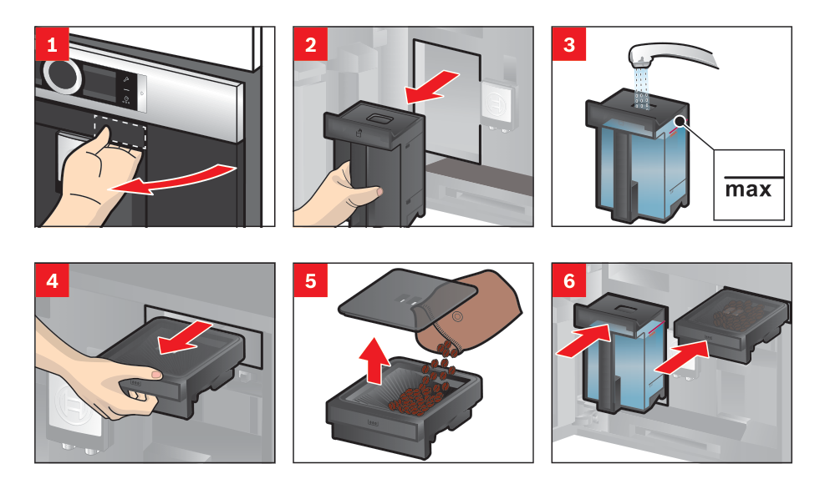
- Water & beans: Slide the machine out, fill the water tank with fresh cold water to the max line, and add beans to the bean drawer.
- Milk drinks: Fill the milk container, assemble the milk hose and clip it to the machine.
- Power on: Press the power button. It runs a short rinse through the spout straight away, so place a cup under the outlet first to catch it. It rinses the same way when you switch off.
- Black coffee: Place your cup under the outlet, tap the screen to choose Espresso or Caffe Crema, then press start.
- Milk drinks: Choose Cappuccino or Latte Macchiato. With the milk container connected it froths the milk and pours automatically.
- Set the amount & strength: Before you press start, adjust the cup size (quantity), the strength, and for milk drinks the milk ratio and temperature, using the segments on the screen.
- Two cups & hot water: Place two cups under the outlet to pour two at once, or dispense hot water for tea or to pre-warm your cup.
- Favourites: Save a drink you like, with your settings, as a colour-coded Favourite on the display.
- Daily: Refill the water tank with fresh cold water and empty the drip tray and grounds container when prompted.
- Milk rinse: After every milk drink the machine asks for a quick rinse, leave a cup or the container under the outlet.
- Cleaning: If the display asks for a cleaning or descaling programme, tell us and we will run it.
Freshly made drinks and the milk system are very hot.
Open the full Bosch guide (PDF) →Source: official Bosch guide, quick reference.
Heat, cook or defrost in a few minutes.
- Cookware: Use a glass, ceramic or porcelain dish with no metal or gold/silver rims, and place it on the glass floor.
- Power on: Press the on/off button.
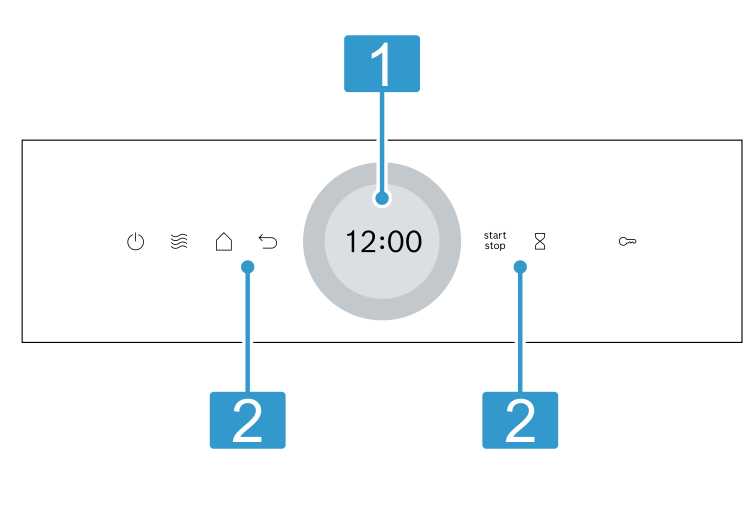
- Set a programme: Press Microwave, turn the setting ring to the power you want and confirm, set the cooking time, then press start.
- Power levels: 90 to 180 W to defrost, 360 W for delicate food, 600 W to heat and cook, boost for liquids.
- Cover food: Cover dishes to avoid splashes and heat more evenly, and stir or turn food partway through.
- Quick heat: Press start on its own to run one minute at the preset power.
- Pause: Open the door or press start/stop to pause, then close the door and press start to carry on.
- After use: Wipe the compartment with a soft damp cloth. Metal (like a spoon in a mug) must stay about 2 cm from the walls.
Never run the microwave empty, and do not heat sealed containers or eggs in their shell.
Open the full Bosch guide (PDF) →Source: official Bosch guide, English user manual.
One oven for baking, roasting, air frying and gentle steaming.
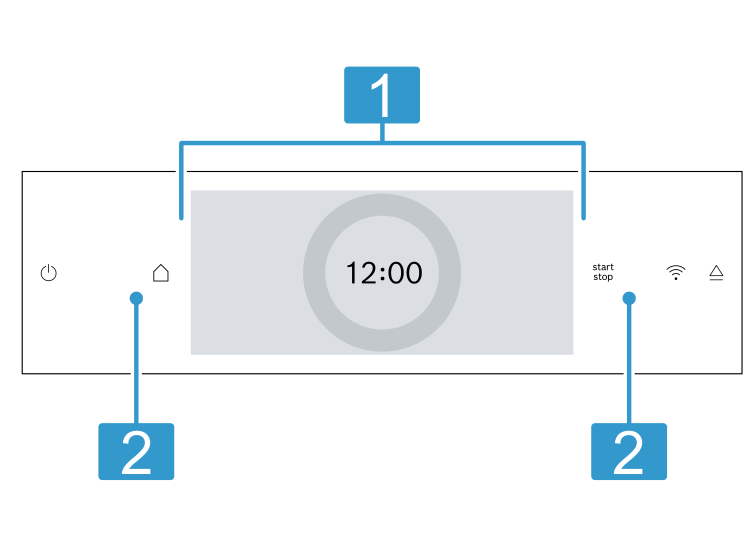
- Power on: Press the on/off button. The menu appears on the display.
- Choose heating: Press Types of heating, pick one (4D hot air for most baking and roasting, Top/bottom heating for cakes, plus Air Fry, Pizza and Grill), set the temperature with the ring.
- Shelf level: Slide the tray or wire rack into one of the three shelf positions.
- Cook: Add a cooking time if you like, then press start. For baking, let the oven reach temperature before putting food in. You can change the temperature any time.
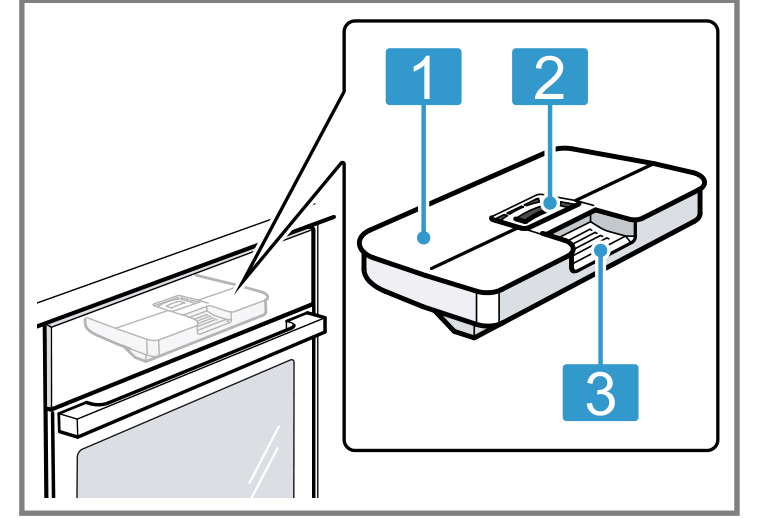
- Fill the tank first: Press the control panel so it pops out, lift out the tank, fill to the max mark with cold water only, and click it back in.
- Choose a steam mode: Press Steam, then Steam Plus (vegetables, fish, cereal), Reheating (plated meals and bread), Defrost, or Proving dough.
- Cook: Set the temperature, set a cooking time (always required for steam), and press start.
- Added steam: Combine steam with normal heating for a crisp crust and juicy roasts.
- Finish: Switch off. After steaming, empty the water tank and wipe the compartment dry.
Hot steam escapes when you open the door, so open it carefully.
Open the full Bosch guide (PDF) →Source: official Bosch guide, English user manual.
One machine for both. It can wash 10.5 kg, but it can only dry a much smaller load, so the two numbers below matter.
- 1. Before you load: Sort by care label and empty every pocket.
- 2. Load the drum: Up to 10.5 kg to wash. If you also want to dry, stay at 6 kg or less, and less again on the gentler programmes. Close the door.
- 3. Detergent: Pull the drawer out. Detergent goes in compartment II (main wash), fabric softener in the middle compartment, compartment I only if you are running a pre-wash. Push the drawer back in.
- 4. Programme: Turn the selector. Cottons for towels and sheets, Mix Load for everyday mixed laundry, Delicates/Silk or Wool for anything soft, Wasch & Dry 60 min for a small load washed and dried within the hour.
- 5. Adjust if you like: Temp. and Spin Speed to change either, Speed Perfect for a shorter cycle, Extra Rinse for sensitive skin, Anti Stain for a stain type, Ready In to set the time you want it finished.
- 6. Drying: Press Wash+Dry to have it dry straight after the wash, or to run drying on its own.
- 7. Start: Press Start/Pause.
| Programme | Wash | Dry |
|---|---|---|
| Cottons up to 90°C | 10.5 kg | 6.0 kg |
| Anti Bacteria up to 60°C | 6.5 kg | 5.0 kg |
| Mix Load up to 60°C | 4.0 kg | 2.5 kg |
| Synthetics up to 60°C | 4.0 kg | 2.5 kg |
| Delicates / Silk up to 40°C | 2.0 kg | — |
| Wool up to 40°C | 2.0 kg | 1.0 kg |
| Down | 2.0 kg | 2.0 kg |
| Outdoor / Waterproofing | 1.0 kg | 1.0 kg |
| Lingerie | 1.0 kg | — |
| Wasch & Dry 60 min up to 40°C | 2.0 kg | 1.0 kg |
If you want a full wash dried afterwards, take part of the load out before the drying starts.
- End: The display shows End. If it shows Hot, the drum is still cooling down. Wait, up to about ten minutes, and do not change the programme.
- Take it out: Within about 15 minutes, otherwise the machine starts an anti-crease phase and keeps turning for another half hour.
- Close down: Turn the selector to Off and leave the door and the detergent drawer open so the drum dries out.
- Child lock: Hold Hygiene Care and Ready In together for about three seconds. The same again unlocks it.
- It stopped mid spin: E:32, H:32 or E:60-2B means the load is sitting on one side. Open the door, spread it out and restart.
- It will not fill: E:30-10 or H:95. Message us and we will come and look at it.
- It will not drain: E:18, E:30-80 or E:36-10. Message us and we will come and look at it.
Drying is the part to be careful with. Never dry anything filled with foam or with polyamide, polyester, polyethylene, polypropylene or polystyrene, and never dry anything that has had oil, wax, suncream, solvent or cleaning fluid on it unless it has been properly washed first, because it can catch fire in the heat. Do not stop a drying cycle early either, the laundry needs the cool down at the end.
Open the full Bosch guide (PDF) →Source: official Bosch user manual for the WNA264U9ID.
Salt and rinse aid are already filled. All you need to do is load it, drop a tab in and pick a programme.
- 1. Scrape, do not rinse: Tip large food remnants into the bin. Rinsing under the tap first is not needed and actually washes worse, the machine reads how dirty the water is.
- 2. Load the bottom basket: Plates, pots and pans and anything heavily soiled, dirty side facing the middle. Nothing tall enough to block the spray arm above it, give both arms a spin by hand to check they turn freely.
- 3. Load the top basket: Cups, glasses and small bowls, all face down so they do not fill with water. Plastic goes up here too.
- 4. Cutlery: Points and blades down. Spoons separated so they do not nest.
- 5. Detergent: One tab in the dispenser in the door, then close the flap. Never washing up liquid, it foams and floods the machine.
- 6. Programme: Press the On/Off button, then the programme button you want (see below).
- 7. Start: Press Start and close the door. It only runs once the door is properly shut.
- Eco 50°C is the one to use almost every time. It is the longest on paper but the gentlest and the most economical, and it cleans normal plates and glasses perfectly. Put it on when you go to bed.
- Auto if you are not sure. Sensors decide the temperature and the length from how dirty the water is.
- Quick 60 min when you need the plates back the same evening. Mixed everyday load, lightly dried on.
- Quick / short wash 45°C for delicate glasses and lightly used tableware.
- Intensive 70°C for pots, pans and anything burnt or dried on hard.
- Machine Care is a cleaning cycle for the machine itself. Only run it empty, and only if we ask you to.
- Half load when the machine is only part full. Less water, less time.
- HygienePlus holds a higher temperature for longer. Useful for chopping boards and baby bottles.
- SpeedPerfect / VarioSpeed shortens the programme, using a little more water and power.
- Timer delays the start by up to 24 hours. The display shows h:01 up to h:24.
- End: The display counts down to 0:00. Open the door a hand's width and leave it for ten minutes, the steam escapes and everything dries by itself.
- Unload the bottom basket first, otherwise the drops sitting on the upturned cups above run down onto the dry plates.
- Let it cool before you handle glasses, they are fragile while still hot.
- Opening it mid cycle: Fine, but do it slowly, hot steam comes out. Press Start again after you close it.
- Button lock: Holding a button for about three seconds locks the panel so nothing gets pressed by accident. The same again unlocks it, and it clears itself at the end of the programme.
- A small light on the panel means the special salt or the rinse aid is running low. It is nothing urgent, just tell us and we will top it up.
- It will not fill: E:32-00. Message us and we will come and look at it.
- It will not drain: E:61-03 or E:92-40, the filters or the pump need cleaning. Message us and we will come and look at it.
Not everything belongs in here. Wooden boards and handles, good knives, cast iron, fine painted glass, silver and anything marked hand wash all come out damaged. Wash those in the sink.
Open the full Bosch guide →Source: official Bosch operating instructions for the Series 4 dishwasher.