
Wellness
How to use the sauna and the ice bath.
Solace
Sauna
Hybrid sauna · infrared or traditional Finnish
Two ways to heat it, each with its own control panel.
Never run infrared and traditional at the same time. Only one may ever be on. Running both overloads the power and the sauna shuts down. Before you switch one on, check the other panel is off.
Which mode
- Infrared: Gentler, lower heat. Good for a longer, relaxed session of up to 40 minutes at 40 to 60°C.
- Traditional Finnish: Intense heat, with steam if you pour a little water on the stones. Best kept to 10 to 20 minutes at 80 to 100°C. It can take up to an hour to heat up.
Infrared
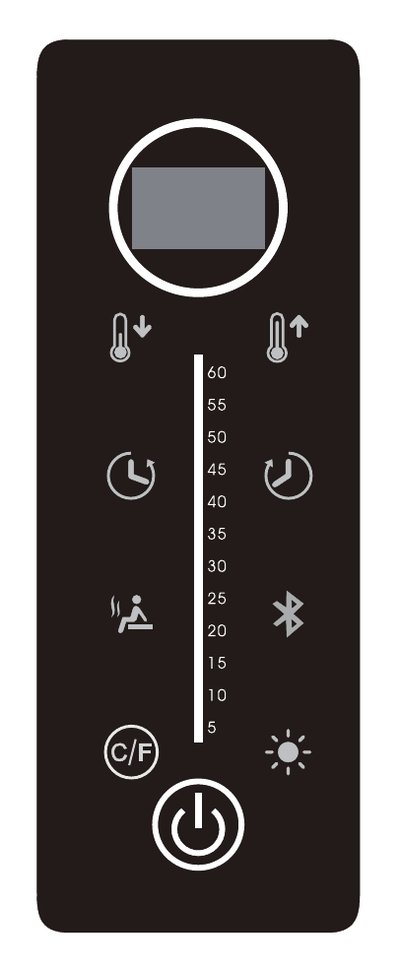
- 1. Check first: The heater panel outside the sauna is switched off.
- 2. Power on: Press and hold the power button at the bottom for 3 seconds. Green means on, red means off.
- 3. Start the heat: Press the infrared heater button, the seated figure on the left. Blue means the heater is on.
- 4. Temperature: Use the two thermometer buttons at the top, down on the left, up on the right. The panels reach about 60°C at most.
- 5. Session: Each session runs for 60 minutes, then switches off by itself.
- Music: Press the Bluetooth button, then find the sauna in your phone's Bluetooth list and pair it.
- Coloured light: Press the sun button. Hold it for 5 seconds to change the colour.
Traditional
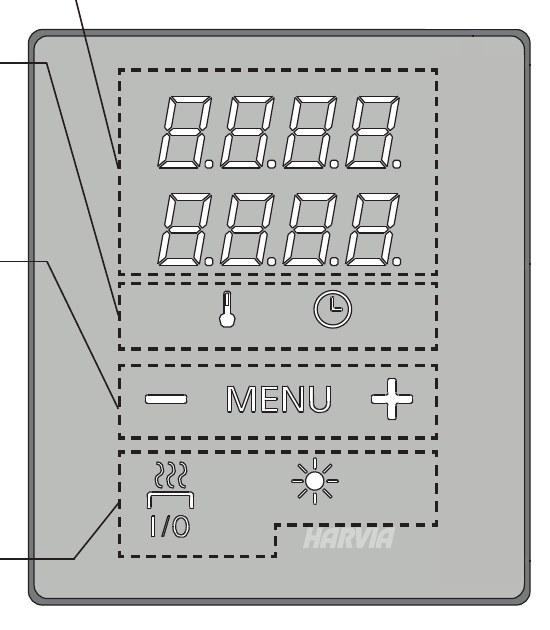
- 1. Check first: The infrared panel inside the sauna is switched off, and nothing is on or near the heater, no towels hanging over it.
- 2. Start: Press I/O. The display shows the set temperature on top and the time below.
- 3. Adjust: Press MENU, set the temperature and the time with − and +, then press MENU again to save.
- 4. Steam: Pour small amounts of water onto the stones only, never onto the heater itself.
- 5. Finish: Press I/O to switch off. It also stops by itself when the time runs out.
- Ceiling light: The sun button next to I/O.
Good to know
- Sit on a towel, it protects the wood.
- Drink water before and after.
- Switching from traditional to infrared: let the sauna dry out first, the infrared panels must not be damp.
- When you are done: switch it off and leave the door slightly open so it airs out.
- HH on the infrared panel: it got too hot and locked itself. Switch it off and on again. E0 or E1: a sensor fault, message us and we will come and look at it.
No bath products, oils or glass inside, and do not use it during a thunderstorm, after drinking, or if you feel unwell. Stop straight away if you feel uncomfortable, and keep children supervised at lower temperatures.
Solace
Ice bath
Home Pro · tub with a separate chiller
The temperature is already set for you. All you do is switch it on.
Using it
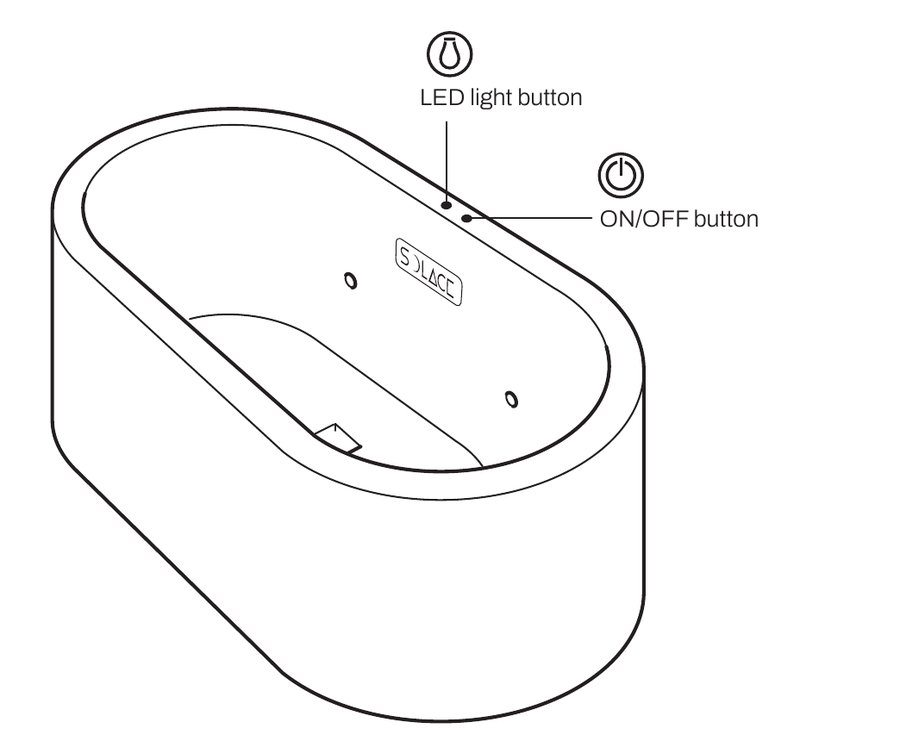
- 1. Switch on: Press the power button on the tub once. It glows blue when it is on. It can take a minute or two before you hear the chiller start, and you will see the water circulating.
- 2. Give it time: The water needs a while to cool down, so switch it on well before you want to use it. Keep the lid on while it cools, it gets cold much faster.
- 3. Lid off: Lift the lid, about 10 kg, and rest it in the lid holder at the back of the tub. Never sit or stand on the lid.
- 4. Light: The light button on the tub turns the underwater light on and off.
- 5. After every dip: Put the lid back on. It keeps the water cold and clean.
Good to know
- Shower first, so no sun cream or body oil goes into the water.
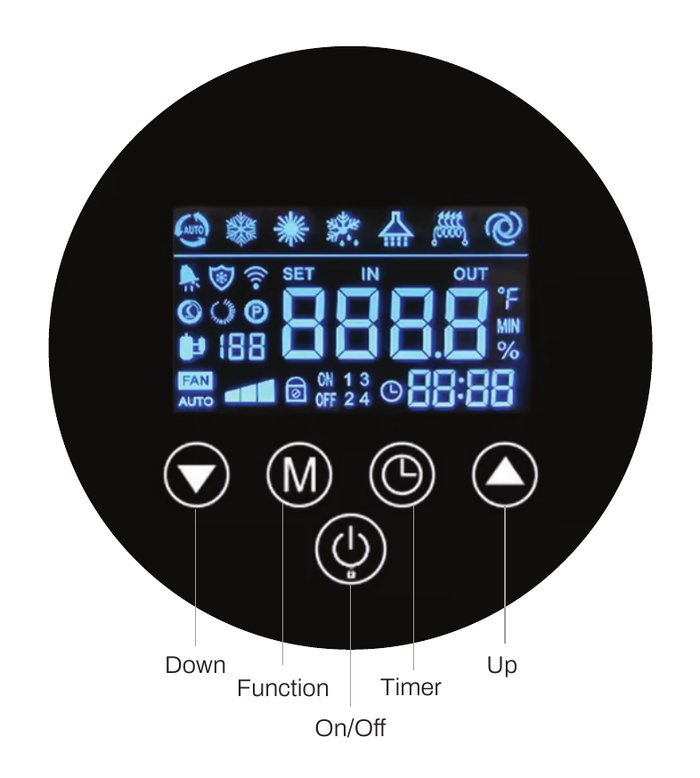
- A code such as E03, FFF, EE or PP on the chiller: switch the tub off and message us, we will come and look at it.
Keep dips short and get out if you feel unwell. Never leave children alone near the tub.